Category: Code
-

Downloading elements during the documentation
By default, Pulse is going to download the elements for all dimensions with fewer elements than the maximum number of elements defined in Pulse.cfg (MaximumElements). If you don’t need Pulse to download elements, you should turn this off. By turning this off, the documentation will be significantly faster because Pulse will not have to request…
-
Making TM1 REST API queries faster
Pulse is mainly making three REST API queries (one to get the sessions, one to get the threads, and one to get the logs). This article shares some recommendations to make these queries even faster. Reducing the size of the tm1server.log file When Pulse is asking IBM Planning Analytics (TM1) to get the logs, TM1…
-
Pulse Features
The complete DevOps software built for TM1 Monitor. Understand. Manage. Monitor. Understand. Manage. One centralized application connected to many TM1 servers When working with multiple TM1 servers, you can choose between installing one Pulse 6 server that will monitor many TM1 servers or installing Pulse 6 on each server. There are many advantages of a…
-
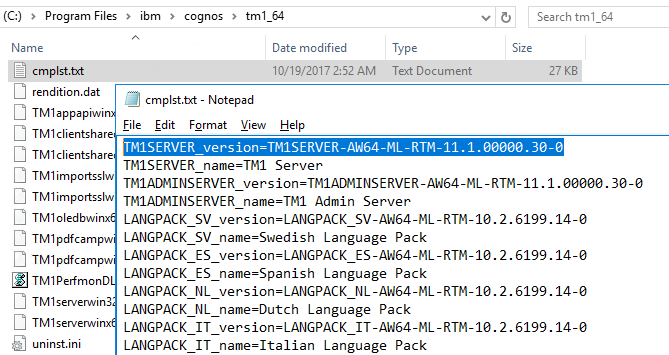
Determine the version of IBM Planning Analytics
Updated on the Nov,2nd 2022
-
Pulse Improve TM1
Continuously improve your TM1 applications As the data volumes, computational complexity, and user community of your IBM Planning Analytics (TM1) applications grow over time, effectively monitoring the health of your system becomes vital to business continuity. And by “effective”, we do not just mean in-the-moment, but over time. Performance Productivity Quality Continuously improving performance System…
-
Pulse Migration
Migrate faster with confidence The Pulse migration features bring you the confidence to migrate IBM Planning Analytics (TM1) objects quickly by understanding all impacts on the TM1 objects, quickly rollback changes and much more… Understand all possible impacts Pulse automatically documents all your TM1 objects. Pulse’s smart documentation brings you the confidence to apply new…
-
Pulse Monitor
Monitor all your servers on one screen Pulse gives you the confidence to handle the complexity that comes with expanded use of your applications. Monitor what’s happening Pulse allows you to monitor your system live in both the web interface and the rich Windows client. All of the important metrics second by second are in…
-
Arc and Slice v4.0 is now available
A new version of Arc and Slice is now available to download. Version 4 is a big milestone in the history of Arc and Slice. You can now connect your Arc server to Pulse to unlock many new features in your Arc application, such as Instance/Server Monitoring, Full Model Search, Alerts and Change Tracking. We…
-
Pulse v6.2 is now available
Pulse v6.2 comes with many optimizations in the logic to determine the status of the TM1 instances. The main new feature is the connection with Arc.
-
Making it Easier to Write and Test MDX Queries with Arc
As we explained in a previous article, MDX is becoming more and more important in the IBM Planning Analytics / TM1 community and it is one of the key skills that any TM1 developer needs to have in order to make the most of the software.