Category: Pulse
-

Exporting changes by users to CSV file
Pulse will log all of the changes whether they are through a migration package or manually. This information can be easily retrieved from the Pulse web client (go to Change Tracking > Change History and then choose the instance):
-
The ALM software built for TM1
ALM (Application Lifecycle Management) provides an enterprise the opportunity to expedite application updates while maintaining appropriate visibility, control and security over the components and processes of core enterprise applications. When an organization relies on operations, financials or enterprise data through a technological infrastructure, periodic application maintenance is typically mandatory. Appropriate ALM facilities the development, process…
-
Including control objects and bedrock processes to source control and dependencies
Control objects and Bedrock processes are not included by default in the source control and in the dependencies (when using the migration).
-
Including control objects and bedrock processes to source control and relationship diagrams
Control objects and Bedrock processes are not included by default in the source control and the relationship diagrams features.
-
Allowing Pulse to redirect host
The default URL for the Pulse Web Client is http(s)://localhost:8099 or http(s)://serverName:8099.
-
New to TM1… the power of search
IBM Planning Analytics (TM1) has been successful all over the years thanks to its very powerful and flexible calculation engine.
-

Considerations when monitoring a TM1 with custom SSL key store
If you enable SSL to your TM1 server and you configure the latter using a custom key store, you might get the following error when executing a migration for chores and processes:
-
Changing the frequency of the Pulse Elasticsearch indices
This article is only relevant if your server is running short of disk space and that you want to reduce the size of the Pulse Elasticsearch cluster.
-
How to improve TM1 Lifecycle Management with Pulse for TM1
aasa
-
Deleting Pulse Elasticsearch indices
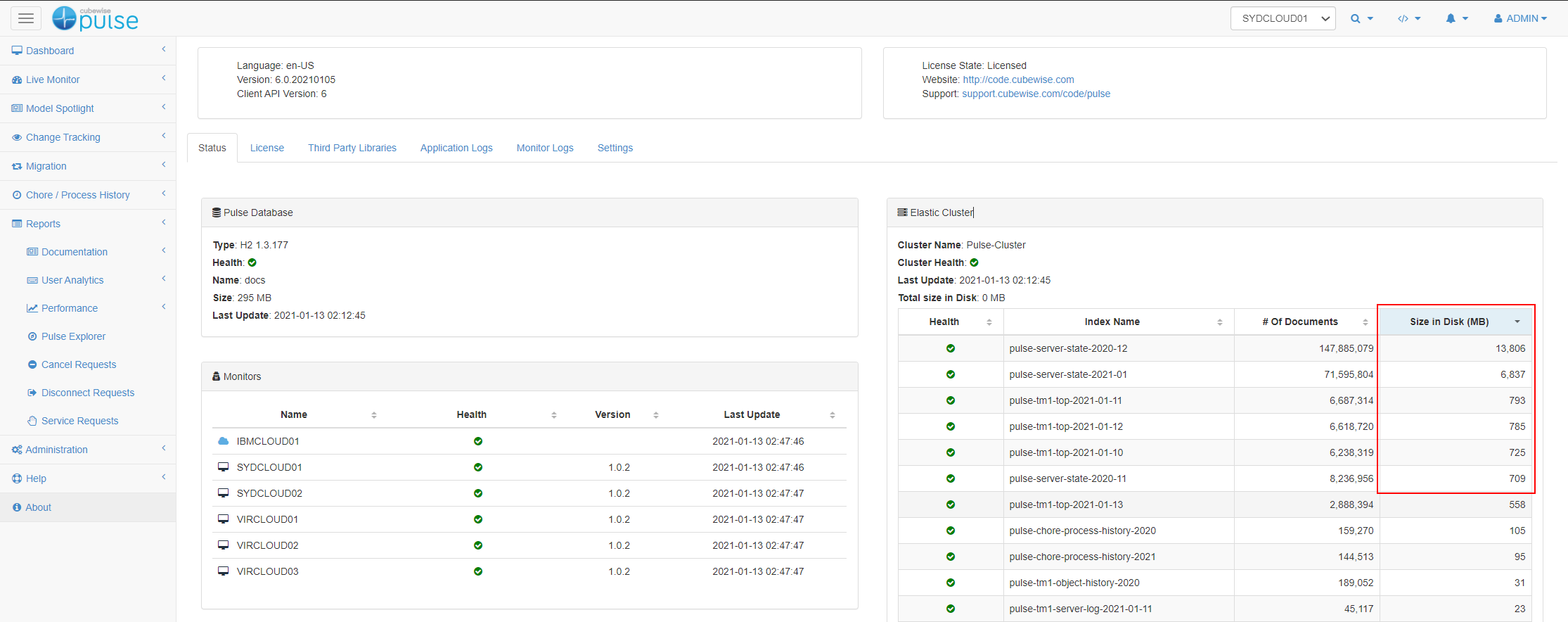
The size of the Elastic Cluster can be found in the Pulse About page: