Category: Pulse
-
How to Meet IT Best Practices Using Pulse
Navigating the realm of IT best practices can be a complex journey, especially when it involves change tracking and repository management. This blog delves into how Pulse can seamlessly integrate with your IT standard procedures, particularly in the context of using IBM Planning Analytics (TM1) with a remote GIT repositories such as BitBucket, GitHub, or GitLab. The Challenge of Integrating GIT with TM1 Integrating GIT into your TM1 development process might seem straightforward but is often fraught with pitfalls. Typically, IT best practices require the following steps: However, this process is easier said than done. There are several potential issues: How Pulse Can Help Pulse is designed to address these challenges head-on, streamlining your processes and ensuring adherence to IT best practices: The Benefits of using Pulse Using Pulse to integrate your TM1 development with GIT offers numerous advantages: Using Pulse not only ensures compliance with IT best practices but also enhances the efficiency and reliability of your TM1 development process. Embrace Pulse, and watch as your integration challenges become a thing of the past.
-
Pushing Pulse VCS folder into a remote GIT
Pulse is constantly tracking changes made by IBM Planning Analytics (TM1) developers. These changes are stored in a local vcs folder. It is possible to send these changes into a remote GIT repository. To do that, a script is available inside the vcs folder: About the aunthentication: GitRemotePush uses the windows credential helper of git,…
-
Pulse v6.5 is now available
Pulse v6.5 includes new exciting features such as live migration of cube data and monitoring any Windows service. Live migration of cube data It is now possible to migrate data from one instance to another in real-time. With this new option in the Pulse Live Migration feature, you can move cube data from one TM1…
-
Pulse v6.4 is now available
Pulse v6.4 includes many new features such as a support for TM1 v12, a new button to generate alerts, being able to export the flow diagram and many more fixes… Support for TM1 v12 on AWS and MCSP It is now possible to monitor and manage TM1 instances running on IBM Cloud AWS and MCSP…
-
User Behavior Analysis and Reporting in TM1
Analyzing how a financial system is used provides several benefits for individuals, businesses, and regulatory bodies, and IBM Planning Analytics (TM1) systems are no different by any means. Why it is important even for TM1 Understanding how the user base interacts with your TM1 model offers several benefits: 1. Increased User Satisfaction: By comprehending how…
-
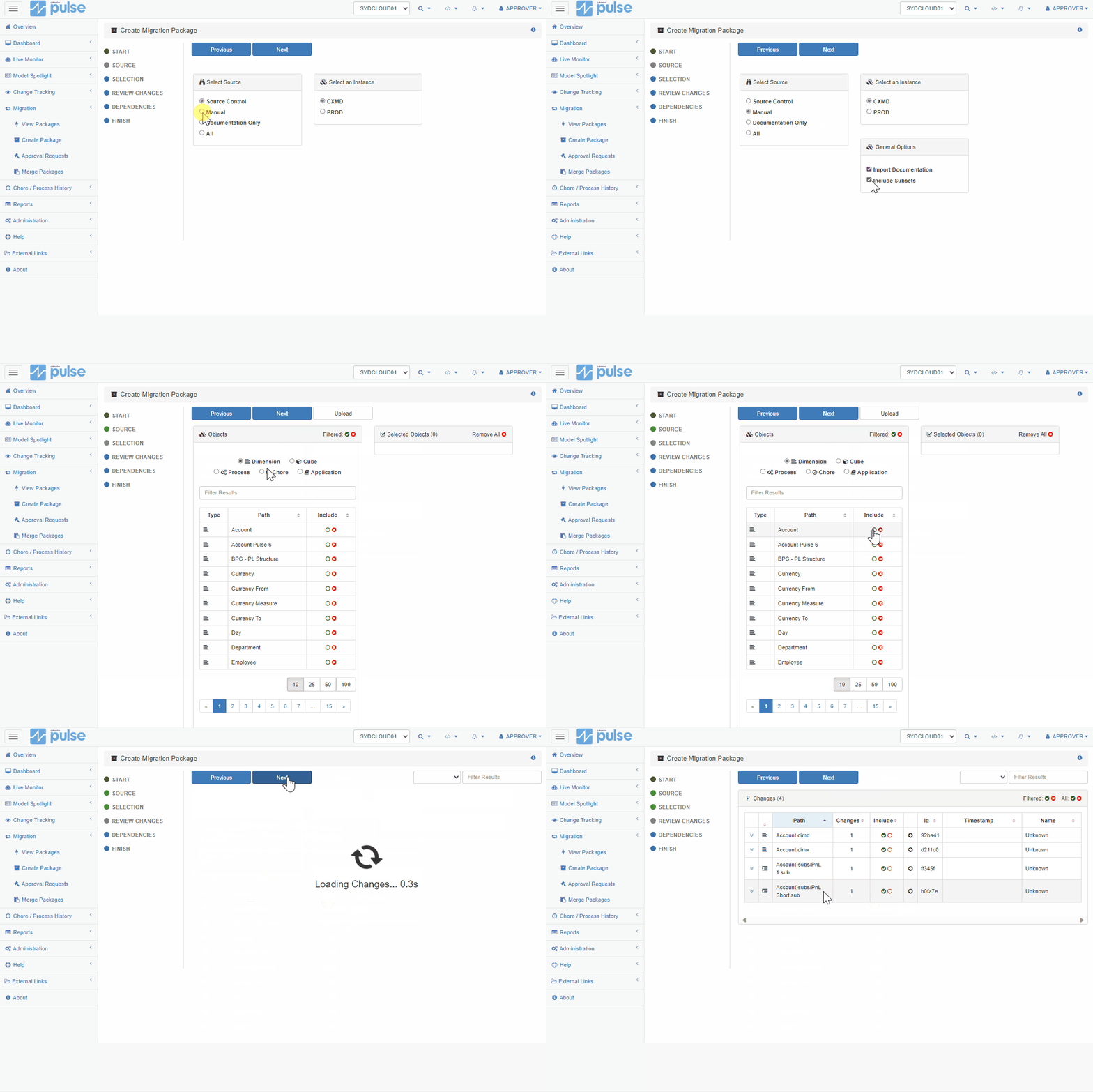
Enabling the Live Migration of subsets with Pulse
Live migration of subsets has been introduced in Pulse v6.3.0.
-
Using active directory to manage Pulse groups and users security
Starting with v6.3.0, the Pulse groups and users security can now be imported from an active directory.
-
Pulse v6.3 is now available
Pulse v6.3 includes many new features such as a new homepage, live migration of subsets, documentation update from your code, approval feature for the migration and many more fixes…
-

Norgine
Norgine is a leading European specialist pharmaceutical company with over 110 years of expertise and a presence in all major European markets. Monitoring Users Accessing TM1 Through Workflow Business Challenge Norgine uses TM1 for financial planning, users have a choice of several different ways of inputting data. All TM1 users must use the TM1 Workflow application…
-

Aveva
The world leading engineering software provider to the plant, power and marine industries. “Pulse has given us great confidence knowing that everything necessary will have been migrated.” Business Challenge The Cognos TM1 model at AVEVA™ plays a critical role in the financial planning, forecasting and reporting for the business. As AVEVA grows, the demand for…