Category: Pulse
-

Stockland
Stockland is the largest diversified property group in Australia. “With Pulse, we are able to track all changes in the various environments” Business Challenge Any changes or updates made on a production system should always be tested, signed off and approved for deployment. With larger TM1 implementations and multiple internal and external TM1 developers working…
-

SCC
SCC is Europe’s largest independent technology solutions company, providing European businesses and public sector organisations “Pulse gives us as developers the option to migrate packages live without the need to bring down services.” Business Challenge The TM1 model here at SCC is core to the business and downtime needs to be kept to an absolute…
-
Pulse Customers
Stories from customers like you Learn how our customers improved their application using our products The leading global aerospace and defence supply chain service provider. “Pulse has helped us to significantly reduce user locks and allowed us to be notified via email if any user is locked in TM1 for more than 5 min.” SCC…
-

Pattonair
Pulse has helped us to significantly reduce user locks
-
Pulse Help
-
Pulse Blog
-
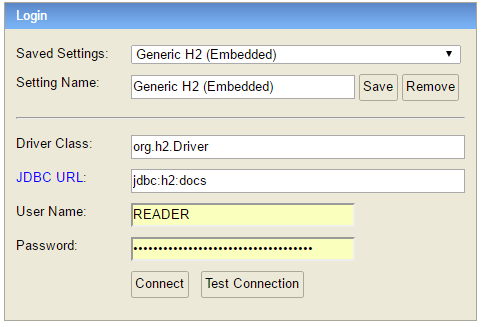
Connecting to the Pulse Database
Since Pulse v5.6, Pulse uses only one h2 database by default, to access the data you just need to connect to the docs.h2.db. Instead of the h2 database, since v5.6 you can migrate your Pulse data to a MS SQL Server.
-
Pulse Download
Download Pulse from the Cubewise Forum *Only available to Pulse customers. If you do not have access, please reach out to your local Cubewise contact or contact us through the website. Getting Started with Pulse Getting started Go through the getting started guide to find which setup works best in your environment. User manual Learn…
-

Fine-tuning for Pulse
The pulse default configuration should be enough for most environments. This article shares some tips to improve the performance of Pulse if it slows down. Migrating to MS SQL Server The default H2 database is single-threaded. It means that if you have many Pulse users and many TM1 instances. The queries to the database might…
-

Downloading elements during the documentation
By default, Pulse is going to download the elements for all dimensions with fewer elements than the maximum number of elements defined in Pulse.cfg (MaximumElements). If you don’t need Pulse to download elements, you should turn this off. By turning this off, the documentation will be significantly faster because Pulse will not have to request…