Category: Configuration
-

Connecting Arc to Atmosphere
The Atmosphere portal is available inside Arc: Atmosphere Subscription Before using Atmosphere, you need an active subscription. To subscribe to Atmosphere, please reach out to your Cubewise local contact or you can click the contact us button on the top right. Activate Atmosphere inside Arc Once your Atmosphere subscription is active, you will get an…
-

Override selected user preferences
Starting with v4.6.1, it is now possible to set the default values for user preferences. the list of properties exported by the User Preference dialog to include a wider variety of preferences supported by Arc. This now includes toolbar visibility preferences and code formatter options. When Arc Server is run or re-started, a new folder…
-

Updating the Pulse Opensearch JVM maximum memory
This article explains how to update the Pulse Opensearch maximum memory. To see how much memory the Pulse Opensearch service is using, open Task Manager and look for pulse-opensearch.exe (in the example below it is currently using 697,644K): The minimum memory should be 1 GB. This value can be overwritten when installing Pulse. Updating the Pulse Opensearch…
-

How to Install the PowerConnect License
The PowerConnect connector does not need a license. Only the PowerConnect service requires a license. To install the PowerConnect service license, just go to the conf folder where the PowerConnect service is installed and put the License.xml file there: Then you just need to restart the PowerConnect Service.
-

Pushing Pulse VCS folder into a remote GIT
Pulse is constantly tracking changes made by IBM Planning Analytics (TM1) developers. These changes are stored in a local vcs folder. It is possible to send these changes into a remote GIT repository. To do that, a script is available inside the vcs folder: About the aunthentication: GitRemotePush uses the windows credential helper of git,…
-
Force Arc users to login to Pulse first
Once Arc is connected to Pulse, you can force Arc users to login to Pulse first. This way you can control who can access Arc, each Arc user will have to be a user in Pulse. To connect Arc to Pulse, follow the instructions in this article: Once Arc is connected, you can then use…
-

Troubleshooting Slice
Slice add-in for Excel connects users to Planning Analytics allowing the users to build dynamic reports connected to TM1 cubes. While it introduces advanced analytical functions, users may encounter challenges. Effective troubleshooting ensures Slice’s smooth operation, allowing for comprehensive utilization of its features for insightful data analysis. Below you will find some of the known…
-
Using active directory to manage Pulse groups and users security
Starting with v6.3.0, the Pulse groups and users security can now be imported from an active directory.
-
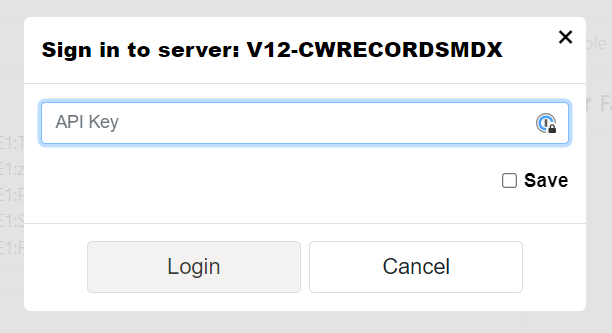
Connecting Arc to IBM Planning Analytics on AWS (TM1 v12)
This article explains how to connect Arc to TM1 v12 hosted on IBM Cloud (AWS).
-
Enabling the Arc Assistant in Arc
The Arc Assistant is now powered by Watson X or any OpenAI compatible service. This new feature allows you to use any OpenAI compatible service to power the Arc Assistant. This feature is great to use the Arc Assistant with your own AI service or with any other OpenAI compatible service. How to activate the…