Category: Configuration
-

PowerConnect Architecture
-

PowerConnect Prerequisites
System Configuration Hardware: Operating System: Microsoft Azure App Registration For OAuth2 authentication, a Microsoft Azure App API App needs to be registered. The required scope for the app is User.Read. Admin consent needs to be applied. The redirect URL for the app is An Azure tenant admin usually does the App registration. Network Configuration for…
-

PowerConnect Service Installation Guide
Prerequisites Windows Administrator credentials are required to complete this setup. Installation Click on “Next”. Read the license agreement, then click on “Agree”. Choose the Authentiaction Mode for Microsoft Power BI Desktop: Select the desired components. Enter the Base URL of the PowerConnect Server: Select the installation location. Default is “C:\Program Files\PowerConnect”. After the files…
-

PowerConnect – Connector Installation and Configuration Guide
This installation guide describes how to install and configure the PowerConnect connector to load data from IBM Planning Analytics to Microsoft Power BI. Prerequisites Installation Upgrade Configuration Testing To ensure a successful installation, open the “Get Data” dialog in Microsoft Power BI Desktop and search for “cubewise”. The following data source will appear: The PowerConnect…
-

Fine-tuning for Pulse
The pulse default configuration should be enough for most environments. This article shares some tips to improve the performance of Pulse if it slows down. Migrating to MS SQL Server The default H2 database is single-threaded. It means that if you have many Pulse users and many TM1 instances. The queries to the database might…
-

Downloading elements during the documentation
By default, Pulse is going to download the elements for all dimensions with fewer elements than the maximum number of elements defined in Pulse.cfg (MaximumElements). If you don’t need Pulse to download elements, you should turn this off. By turning this off, the documentation will be significantly faster because Pulse will not have to request…
-
Making TM1 REST API queries faster
Pulse is mainly making three REST API queries (one to get the sessions, one to get the threads, and one to get the logs). This article shares some recommendations to make these queries even faster. Reducing the size of the tm1server.log file When Pulse is asking IBM Planning Analytics (TM1) to get the logs, TM1…
-

Getting started with Pulse v6 or v7
Pulse v6 was rebuilt using the REST API allowing a single Pulse Application Server to monitor many TM1 servers. This version includes many new features such as the Pulse Explorer (bringing a new way to easily view what is happening on all your TM1 instances second per second) and support for hierarchies.
-

log4j Exploit – Possible Action Required
There has been a recent discovery of an exploit in the commonly used log4j library. The vulnerability impacts versions from 2.0 to 2.14.1. The vulnerability allows an attacker to execute remote code, it should therefore be considered serious.
-
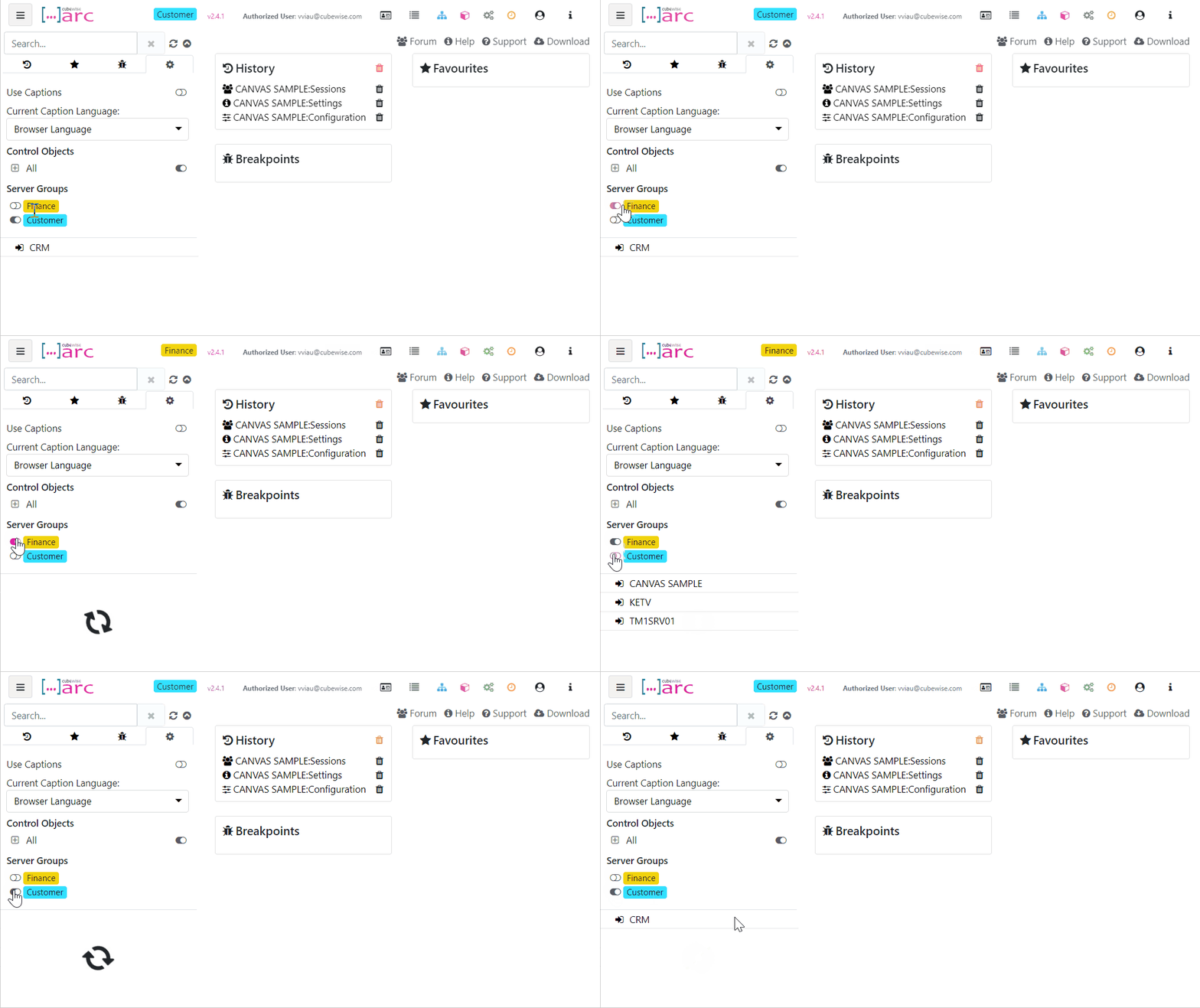
Grouping TM1 servers and instances in Arc
Starting with Arc v2.4, we have added additional support for multiple admin hosts and connections so you can group them together and toggle between the groups, we have called them Server Groups. This is targeted at environments that have many admin hosts and connections: