Category: How To
-

Connecting Arc to Atmosphere
The Atmosphere portal is available inside Arc: Atmosphere Subscription Before using Atmosphere, you need an active subscription. To subscribe to Atmosphere, please reach out to your Cubewise local contact or you can click the contact us button on the top right. Activate Atmosphere inside Arc Once your Atmosphere subscription is active, you will get an…
-

Override selected user preferences
Starting with v4.6.1, it is now possible to set the default values for user preferences. the list of properties exported by the User Preference dialog to include a wider variety of preferences supported by Arc. This now includes toolbar visibility preferences and code formatter options. When Arc Server is run or re-started, a new folder…
-

Updating the Pulse Opensearch JVM maximum memory
This article explains how to update the Pulse Opensearch maximum memory. To see how much memory the Pulse Opensearch service is using, open Task Manager and look for pulse-opensearch.exe (in the example below it is currently using 697,644K): The minimum memory should be 1 GB. This value can be overwritten when installing Pulse. Updating the Pulse Opensearch…
-
Migrating cube data
Starting with Pulse v6.5.1, cube data can be migrated using the Live option. It means that you can migrate cube data between two TM1 instances without having to restart the instance. Option to include cube data When creating a new migration package, the option Include Cube Data needs to be ticked as below: Then after…
-
Pushing Pulse VCS folder into a remote GIT
Pulse is constantly tracking changes made by IBM Planning Analytics (TM1) developers. These changes are stored in a local vcs folder. It is possible to send these changes into a remote GIT repository. To do that, a script is available inside the vcs folder: About the aunthentication: GitRemotePush uses the windows credential helper of git,…
-

PowerConnect Hands-on
The objective of this hands-on manual is to help you getting started with Cubewise PowerConnect, the complete Power BI Connector for IBM Planning Analytics (TM1). PowerConnect helps you getting your data, metadata and security from TM1 into Power BI. In this user manual you will learn: This manual is available to download for free by…
-

Syncing hierarchies: TM1 and Power BI
A fundamental and very powerful feature of IBM Planning Analytics (TM1) is the use of hierarchies/consolidations, which play a crucial role in organizing and analyzing complex data sets in your model. Hierarchies are structured ways to organize data into different levels of granularity. They allow users to drill down into data, providing insights at various…
-

Slice Hands On – Part 2
The objective of this user manual is to walk you through the main features of Slice. This manual is split in 7 main topics:
-
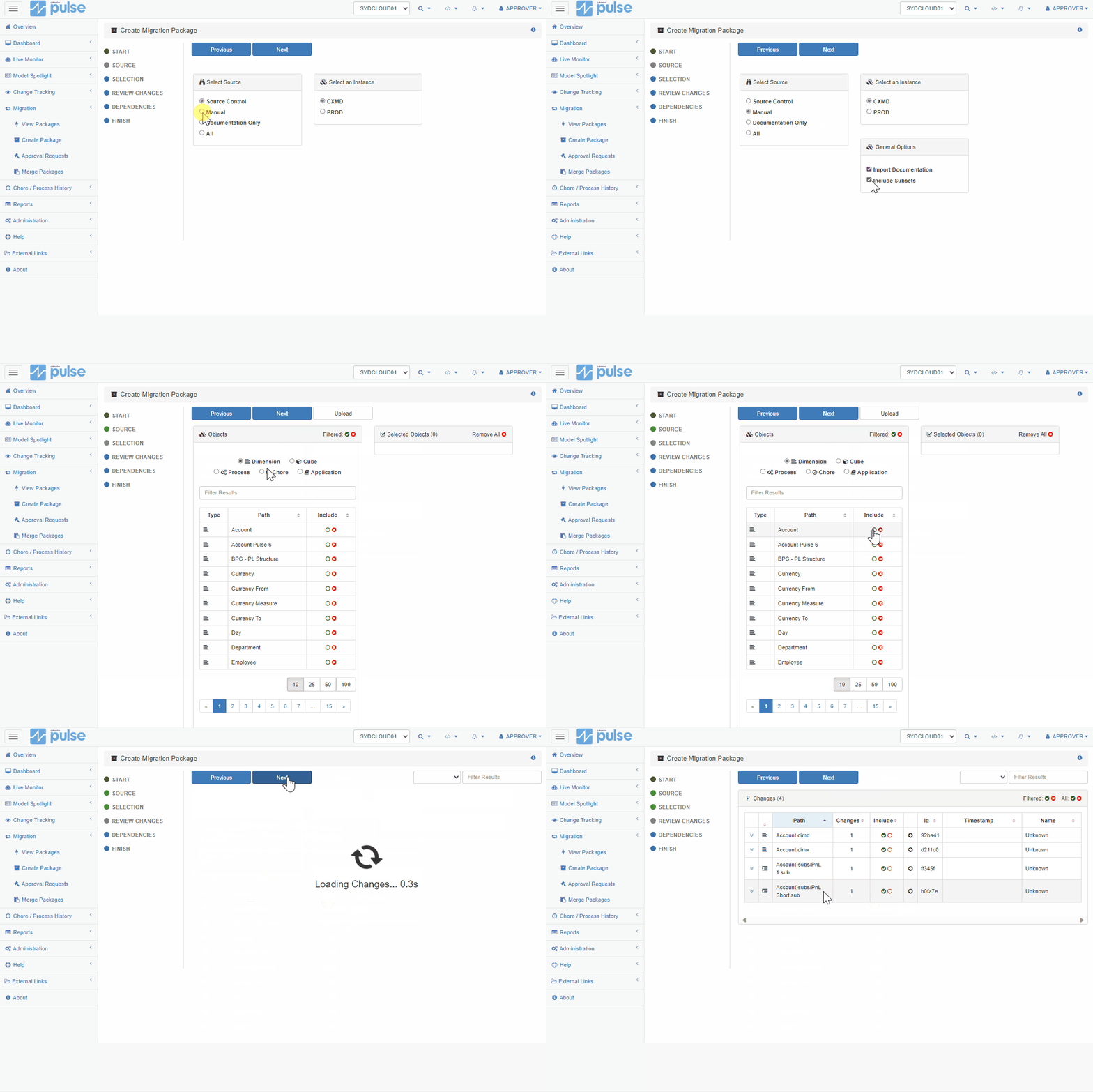
Enabling the Live Migration of subsets with Pulse
Live migration of subsets has been introduced in Pulse v6.3.0.
-
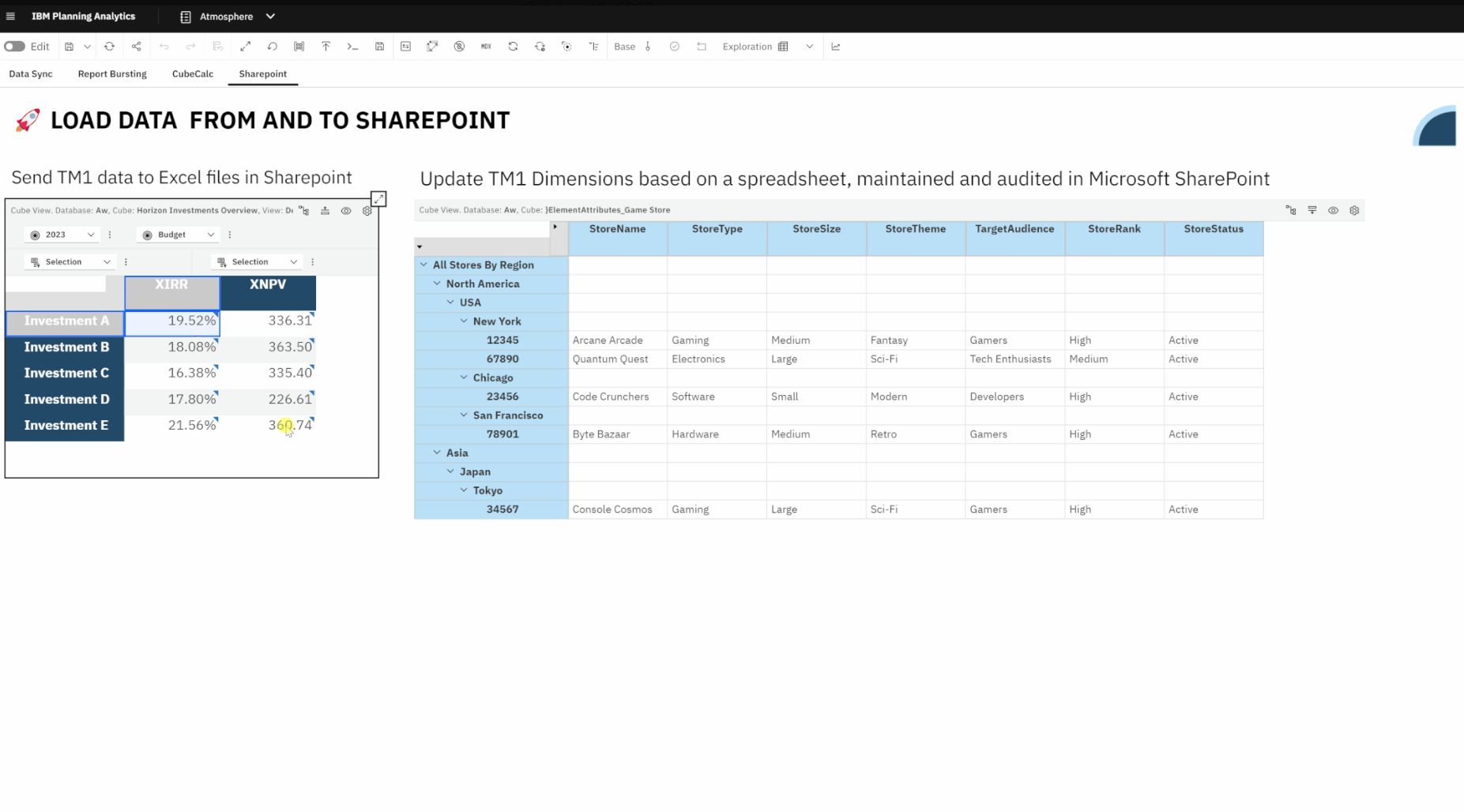
Connecting Planning Analytics TM1 with SharePoint through Atmosphere
Effortlessly exchange cube data between Planning Analytics TM1 and Excel, CSV files in Microsoft SharePoint.